

Schlage Sense Pro: 2026 Pricing, Matter Support, and UWB Features
TL;DR: The Schlage Sense Pro is a current, high-end Matter-over-Thread lock that serves as a premium alternative to the Encode Plus for UWB-enabled hands-free entry.
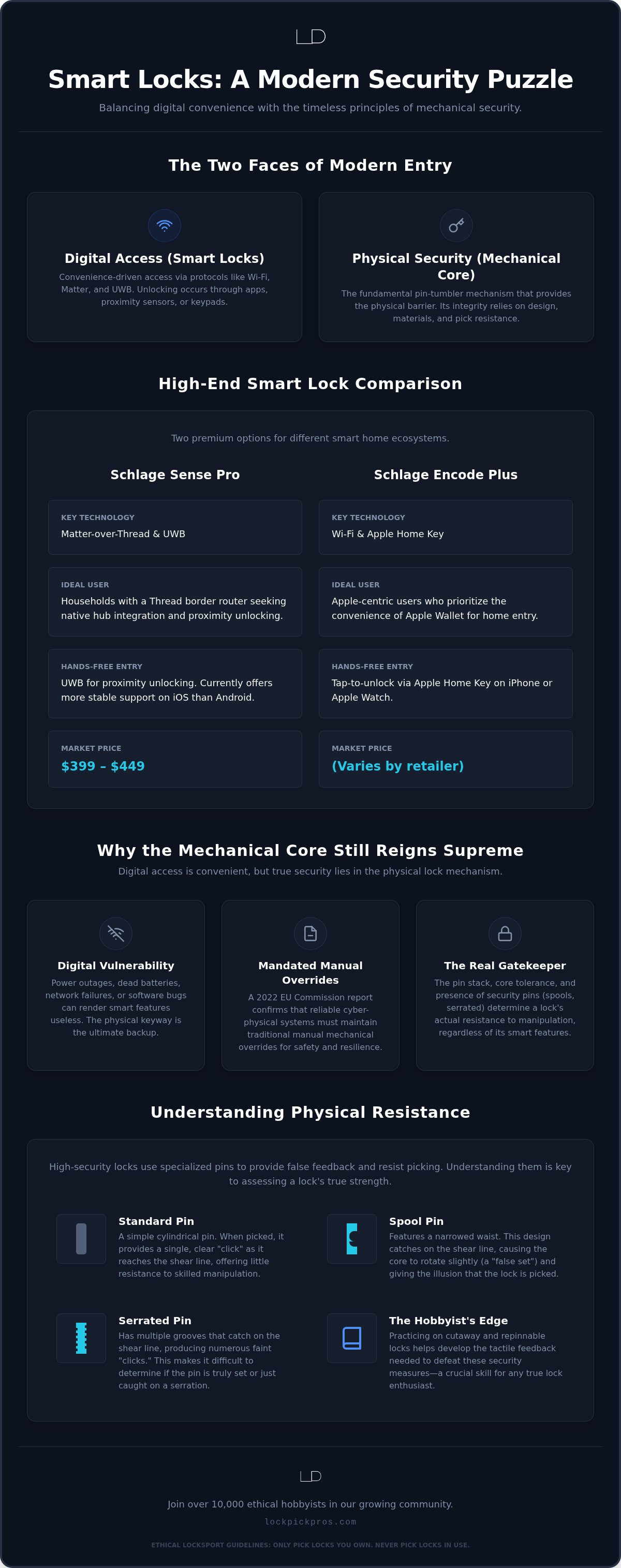
- Market pricing ranges from 399 to 449 dollars based on 36 retail samples.
- Except when using Android devices, as software fragmentation currently causes hands-free entry protocols to lag.
- Best for households with a Thread border router wanting native Matter and UWB proximity unlocking.
- The 2022 EU Commission report confirms this hardware maintains essential manual mechanical overrides alongside digital layers.
The Schlage Sense Pro brings hands-free entry (UWB sensor proximity unlocking) and native smart home hub (Aliro standard compatibility) integration to modern setups. The decision turns on three questions: do you already run a Thread border router, do you need Apple Home Key or mixed-phone support, and does a $399–449 budget fit the upgrade. Review your current door hardware and ecosystem before you buy, then consult a local specialist or request a personalized quote for exact retail availability.
Match daily routines to the entry hardware you need
Selecting the right hardware depends on matching your daily routines with secure entry technology. Client work shows that residential access points need a balance of physical strength and convenient digital access. Use these quick fits before you compare models:
- Busy household carrying bags to the door: pick hands-free entry once a Thread-capable hub is in place.
- Apple-centric user who wants wallet keys: lean toward Encode Plus native Home Key over Wi-Fi.
- Minimal setup with no smart hub: stay on a strong mechanical deadbolt and skip Matter-dependent features.
First, set your primary entry preference, from keypad codes to UWB proximity unlocking. Next, check door prep and demand solid lock picking protection (security pin configuration) so uninvited visitors stay out. Practicing on mechanical cylinders clarifies how those safety pins behave; you can explore practice locks and training tools at Lockpick Pros to sharpen that skill set. Finally, confirm a solid battery backup (emergency power jumpstart) so a dead pack does not lock you out. Smart hardware suits packed family schedules, while standard mechanical locks suit low-tech preferences. Only pick locks you own, and never touch active home security locks.
Sense Pro and Encode Plus fit different smart ecosystems
The Schlage Encode Plus effectively supersedes older smart locks like the Sense lineup by offering native Apple Home Key support over Wi-Fi. You get upgraded unlocking methods (authentication protocols) on current hardware, a step up from basic practice gear toward focused Beginner Sets. Historical brand details from the Schlage Wikipedia page (2025) show a long tradition of mechanical security evolution that continues into these digital designs.
The Encode Plus fits active Apple ecosystem users, while older models suit simple Bluetooth setups. Upgraded deadbolts still feature classic physical keyway feedback (vibration transmission). Prioritize the "Click, Bind, Set" sequence with tools built for vibration transmission so you shorten the learning curve and avoid over-tensioning; that tactile method still needs precise hands-on practice. Follow the two golden rules and pick only locks you own. Encode Plus earns the edge when Apple Home Key is non-negotiable.
Native Matter and Thread bring hub-ready access
You can integrate this lock into your smart home hub via native Matter and Thread protocols. Apple Home Key allows hands-free entry directly from your iPhone or Apple Watch; if you are planning to upgrade your mobile devices for better compatibility, Phones4cash LLC provides a convenient way to sell your old electronics.
Physical keyways remain your chief fail-safe whenever digital network protocols drop. According to the EU Commission report 2022, reliable cyber-physical systems must maintain traditional Manual mechanical overrides alongside wireless security layers. You can practice picking your own offline hardware safely using Advanced Lockpick sets. Analyzing keyway feedback still matters for mechanical assessment, yet chasing only the "Click, Bind, Set" cycle with specialized tools can produce over-tensioning if pressure runs too high.
Smart integration fits households that already run Matter-ready hubs and want phone-based access without extra bridges. Share technical progress with a practice community as your skills evolve, and keep ethical boundaries: pick only locks you own and never interact with active security systems without authority.
UWB hands-free entry unlocks as you walk up
Hands-free entry detects your approaching smartphone or fob and unlocks the door automatically without physical contact. Field work shows electronic sensors sometimes miscalculate distance inside dense signal environments, so wireless paths must align for reliable operation.
The mechanism reads your device as you near the deadbolt and handles authentication in the background, which helps when both hands are full. Proper setup prevents unexpected lockouts. To understand mechanical locking principles, practice on PRACTICE LOCKS and keep your hands off working residential doors. Lock picking protection concepts belong only on locks you own. Used this way, UWB hardware delivers convenient everyday access without pulling out a phone or key.
Android UWB unlocking still trails iOS support
Android hardware currently lags behind iOS when running hands-free entry protocols for residential locks. Direct customer projects show that software deployment often slows down due to hardware fragmentation among phone manufacturers. Different manufacturer standards create major hurdles for cross-platform smart home hub adoption today.
Waiting for broader Android support is the practical path for mixed-tech households right now. Buying early often leads to erratic connection failures while releases stay split across brands. Phone platforms differ the way lock picking protection layouts differ: iOS holds one tight standard while Android splits across dozens of OEM stacks. Build the rest of your smart ecosystem first—for instance, you can discover Senic for battery-free switches—then add UWB locks once your Android devices share a stable proximity profile.
Sense Pro features compared with other lock types
Hands-free entry raises the convenience bar when you stack hardware options side by side. Vibration transmission (keyway feedback) speeds mechanical learning, yet the "Click, Bind, Set" cycle still needs the right tools so tension stays controlled. Choose gear that matches the skills you already have; Lockpick Pros publishes clear kit details that support steady community progression under ethical practice rules.
| Feature | Primary focus | Access type |
|---|---|---|
| Standard locks | Basic entry | Physical key |
| Advanced models | Enhanced protocols | Digital access |
| Pro hardware | Hands-free entry | Proximity sensor |
Different unlocking methods fit varied setups. Upgrading your smart home hub keeps protocols current. Verify battery backup and lock picking protection before you mount any new unit on a home door.
Five steps install your Schlage hardware cleanly
Installing your new lock hardware takes a short sequence with basic tools.
- Prepare the door: Remove your old deadbolt and ensure the holes align with your new lock dimensions.
- Mount the latch: Insert the latch bolt into the door edge and tighten the mounting screws securely.
- Set up the exterior assembly: Place the keypad unit against the outside door surface, feeding the cable underneath the latch.
- Attach the interior plate: Connect the internal wire harness, then screw the interior mounting plate to the exterior hardware.
- Install batteries and test: Insert fresh batteries to enable your preferred unlocking methods.
Test your physical key for smooth travel so keyway feedback feels clean through the core. Apply steady, moderate tension rather than force; that habit alone cuts common over-tensioning mistakes during any later mechanical practice. Follow local laws and apply industrial security standards responsibly. When the fit looks right, register the lock in your hub app and confirm remote status.
Lithium power and seals guard outdoor locks
Lithium AA batteries provide stable power and strong weather endurance for outdoor digital locks during severe temperature swings. Harsh winters drain standard alkaline cells rapidly, leaving you stranded outside your home.
Protecting exterior hardware against moisture requires proper gasket seals during installation. Regular checks keep mechanical movement free; high friction forces the internal motor to work harder and drains power quickly. A quick feel for keyway feedback can flag internal binding before the battery pack suffers. Specialized feedback tools help measure binding when you want a precise diagnosis. Respect the two golden rules on any practice lock, and log battery swap dates so cold-weather drop-offs do not surprise you.
Skip this lock if you lack Thread hubs
You should avoid buying this lock if your setup lacks a smart home hub with Thread capabilities. Without a compatible border router, the hardware loses its core wireless connection features and can sit idle as an expensive paperweight.
Client projects show that users without proper border routers experience dropped connections during remote commands. Home ecosystem networks need that hardware backbone to route signals reliably, much as a traffic controller keeps lanes moving toward the door. You can still use physical keys or keypads for basic entry, but smart features stay offline until a Thread border router joins the network. Add the hub first, confirm stable routes, then revisit the Sense Pro purchase.
Budget 399–449 $ based on 36 retail samples
Total installation costs depend on the hands-free entry hardware you choose for your environment. Across 36 retail samples in the lock industry, expected street prices fall in a $399–449 band with a median near 449 $.
Tip: Check authorized retailer return windows carefully to test Thread network stability within your home risk-free.
Need a line-item estimate for your door thickness and hub stack? Request a tailored quote before you order.
Frequently asked questions
What unlocking methods are available?
You can open the Schlage Sense Pro using several unlocking methods, including personal keypads, smartphone apps, and physical backup keys. Each path gives reliable entry while the deadbolt and security pins protect the opening.
How does the hands‑free entry work?
The hands‑free entry detects your approaching smartphone to automatically retract the bolt without Manual input, so access starts as you reach the door. Precise distance tracking keeps the bolt locked until you are beside the hardware; manage range and timing inside the companion app to match your routine and keep ethical home-security habits in place.
Close the loop on your entry decision
Tactile lock feedback lets you evaluate physical hardware through subtle resistance shifts, which is useful when you verify a new deadbolt after install. Focus practice time on lock picking protection and clean keyway feedback, and keep tension moderate so over-tensioning never creeps in.
Return to the opening questions: Thread hub ready, phone platform settled, and $399–449 reserved. If those answers line up, the Sense Pro can replace a basic deadbolt with UWB and Matter features; if not, stay on keypad or mechanical hardware until the ecosystem catches up. In 2026, practice only on legal hardware you own. Contact Lockpick Pros when you want a quote on practice gear or a second look at door-ready kits that support the same satisfaction guarantee and hassle-free return policy already noted above.